

Contents
If you want to ask us something, you should not have to install somebody else's app first. That is why we run our own chat: on our own servers, on an open standard, with no corporation in between. This article shows you what there is, how to get in and where the limits are.
Why we run the chat ourselves
A customer chat over WhatsApp would have been the easiest route. It would also have meant that every message to us travels through the infrastructure of an advertising company, and that you hand over a phone number just to talk to us. That does not fit the line we follow everywhere else: no tracking pixels on budnuts.de, no cookie banner because there is nothing to consent to, no passing your data to third parties.
So the chat runs on our own systems. It costs us effort and gives you three things: your messages sit with us instead of with a service provider, there is no advertising analysis running in the background, and you do not need an account with a company you never chose in order to talk to us.
What Matrix is
Matrix is an open standard for chat, roughly the way email is one for messages: many servers, many programmes, one shared protocol. Nobody owns Matrix and nobody can switch it off. Our server is one of many thousands worldwide.
In practice that means you can use our chat in the browser without installing anything. Or you take a Matrix programme of your choice, Element for example, and sign in with that. Both lead into the same conversations.
The three ways into the chat
- No accountChat window in the shop, instant and anonymous
- LinkedPrivate channel, community, calls
- PartnersOwn entry via the partner page
They do not exclude each other. You can ask without an account today and decide to link your customer account later. None of it happens automatically, and without your explicit click no chat account is created.
Writing without an account: the support chat
The chat window sits at the bottom right of every page on budnuts.de. One click and you can write. For the first message we need a name and an email address so we can reply even if you close the page in between. Nothing else: no sign-in, no order, no account.
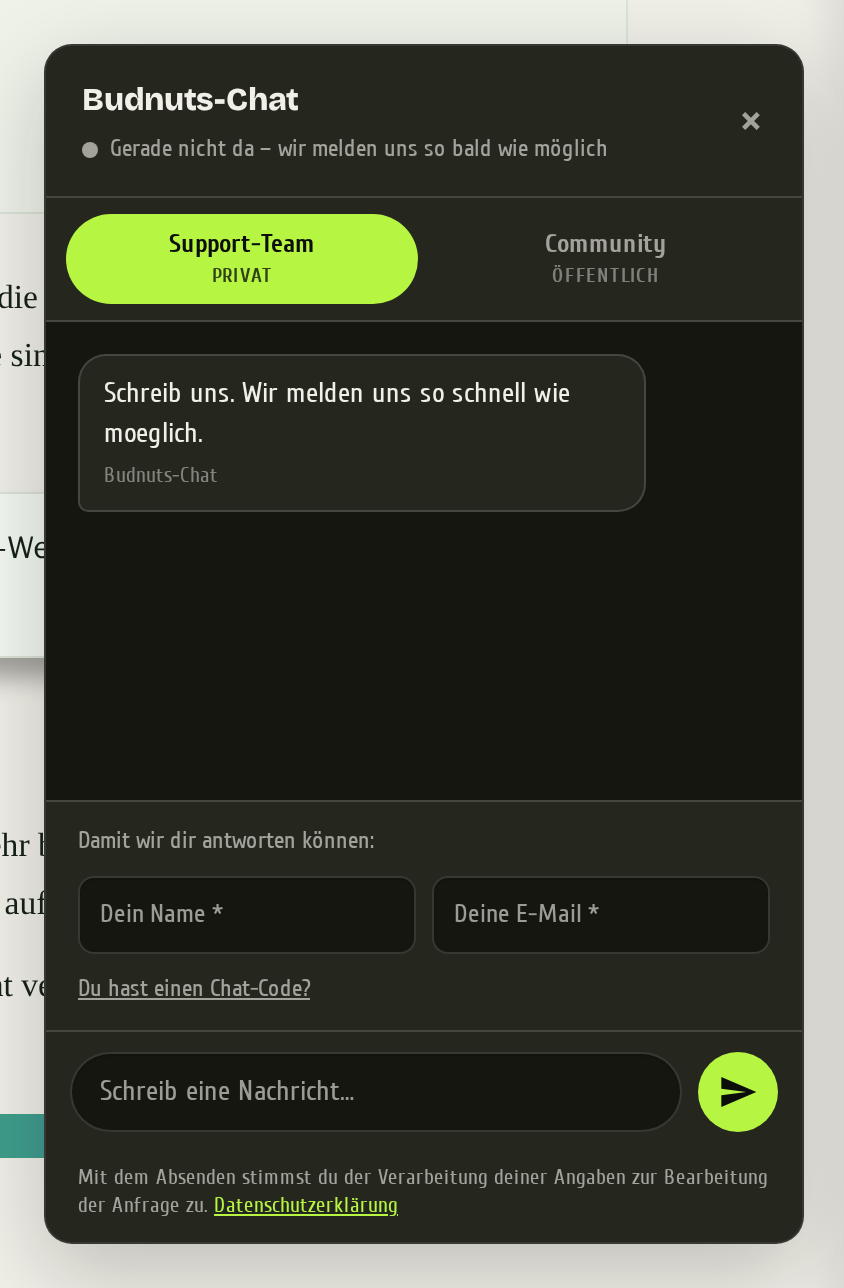
That green dot is meant honestly: it shows whether someone from the team is reachable at that moment. If it is grey you can still write. We reply as soon as somebody is back, and you get an email.
Because such a conversation quickly outlasts a single visit, there is the chat code. It is a short key to your ongoing conversation. Copy it, paste it on another device, and you are back in the same conversation without signing in anywhere.
Just ask us something.
No account, no sign-in. The window opens on this page.
Linking your account with the chat
Everything beyond that hangs on one click in your customer account, under My account, tab "Chat". That page tells you what happens, and that is where you decide. Before it, no chat account exists for you, and you see neither the community nor a private channel.
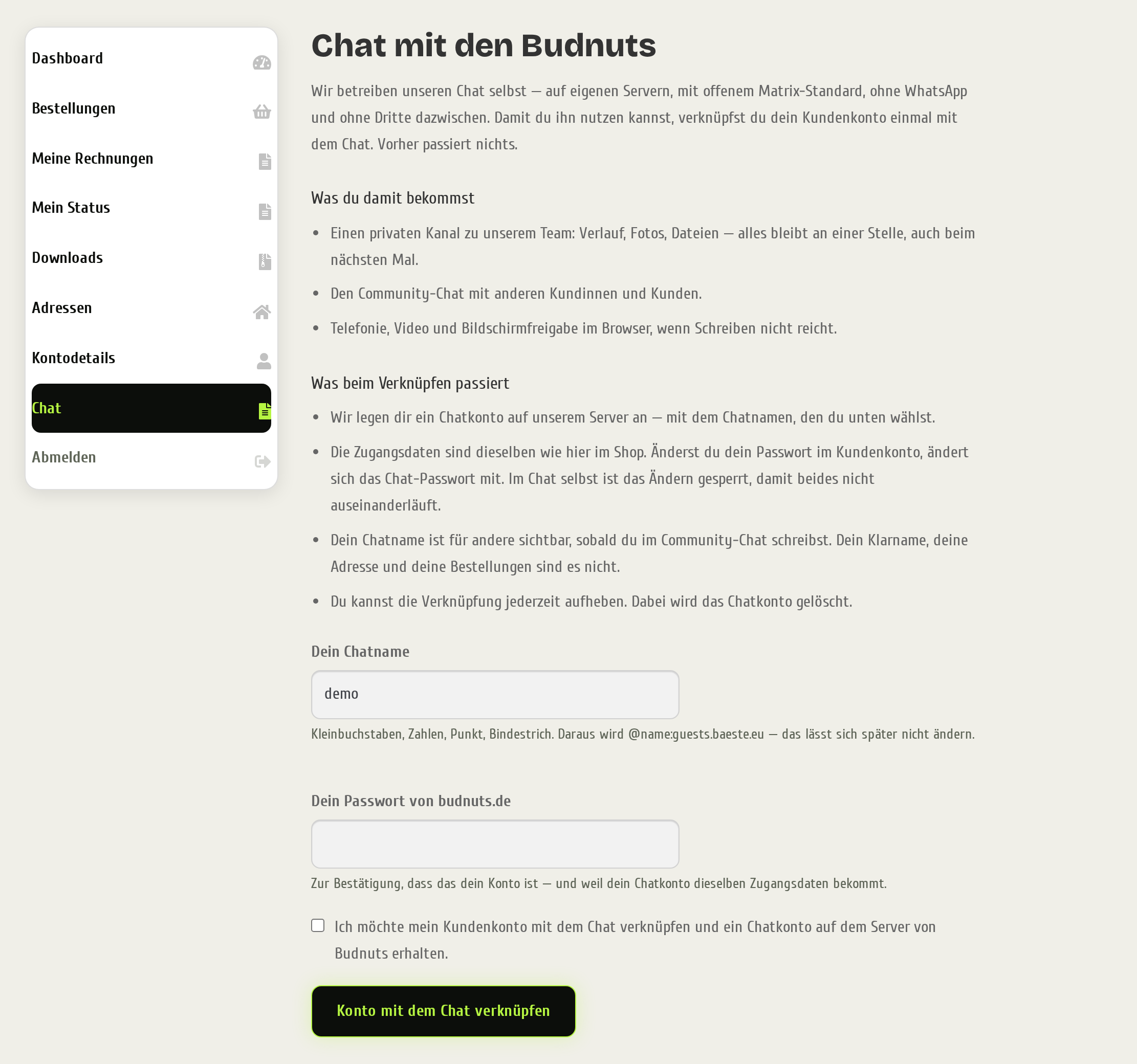
Two things there deserve an explanation.
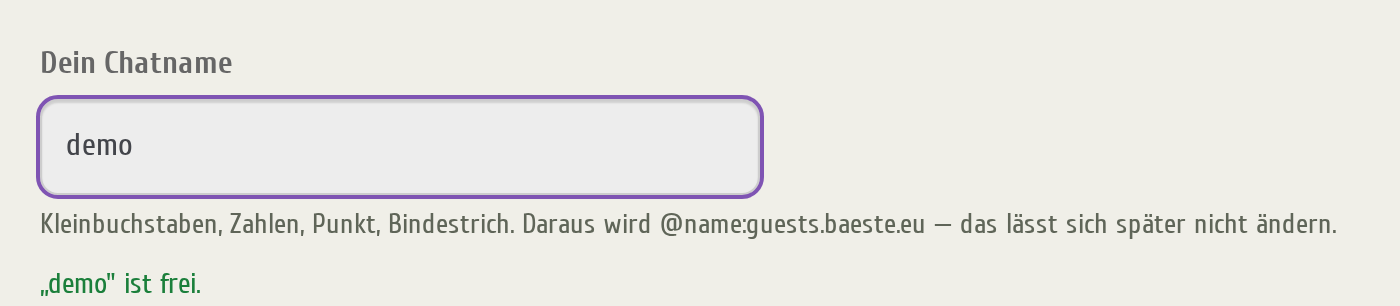
The chat name. We suggest one, you can change it, and availability is checked as you type. Deliberately do not use your email address: the chat name is shown in every room you write in, visible to everybody else. Your real name, your address and your orders are not. And the name cannot be changed later, so it is worth a moment's thought.
The password. Your chat account gets the same credentials as your shop account. That is why we ask for your password once while linking. If you change it later in your customer account, the chat follows automatically. Changing it inside the chat is blocked, otherwise the two would drift apart and you would end up with two different passwords for the same thing.
After that your access is ready. The tab shows your chat name and takes you onward with two buttons: one straight into your channel with the team, one into the chat as a whole.
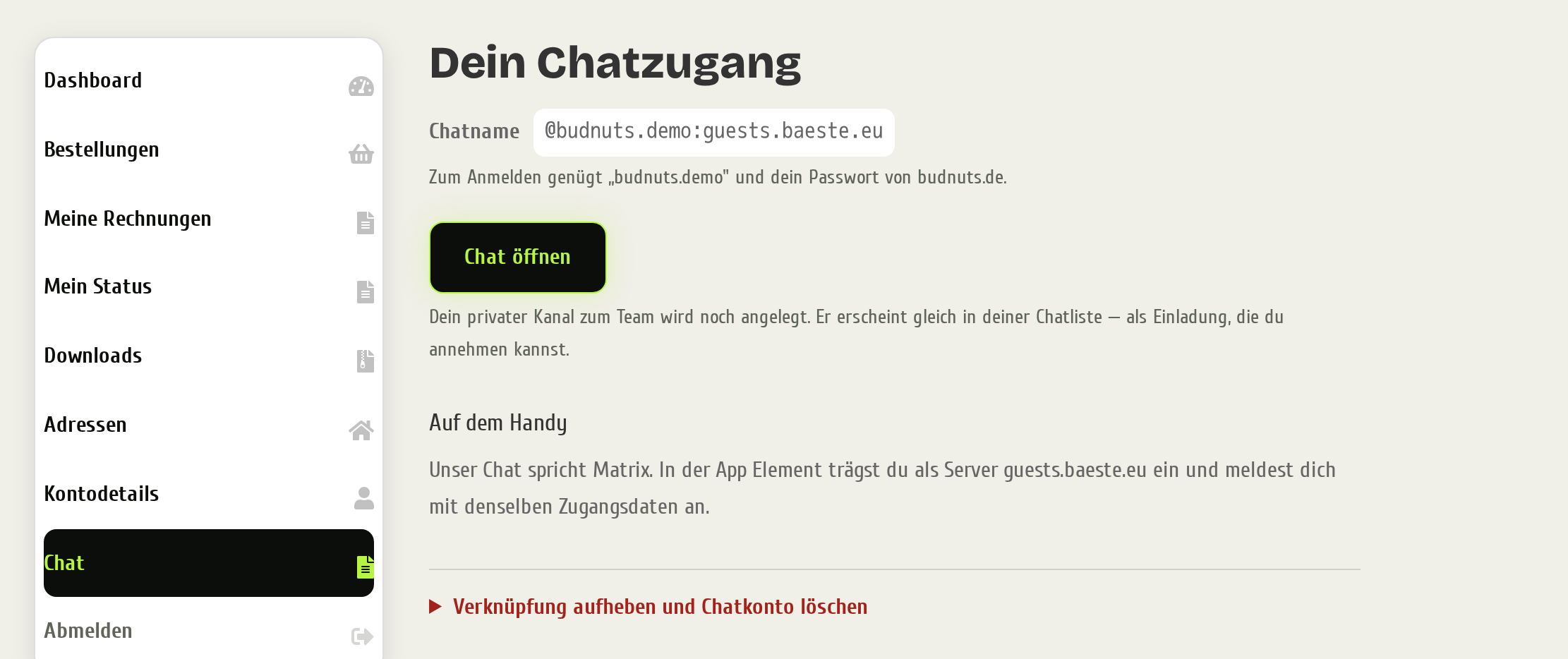
You can undo the link at any time. This deletes the chat account, you leave all rooms and your messages there are gone. Your customer account, your orders and your invoices are untouched. The chat name stays taken afterwards, also for you, so nobody else can claim it and pass themselves off as you.
Your private channel with the team
Linking creates a room containing only you and our team. For you it replaces the anonymous chat window: instead of a conversation that ends at some point, you have a channel that stays. History, photos and files are still there next time, and you do not have to explain your setup from scratch every time.
The first time, the channel sits in your chat list as an invitation. Accept it once and it stays there. It starts out empty, and that is on purpose: just start writing, we will see it.
This channel is end-to-end encrypted: the keys live on your device and on the team's devices, not with us on the server. What that means exactly, and why it does not apply to the other routes, is further down.
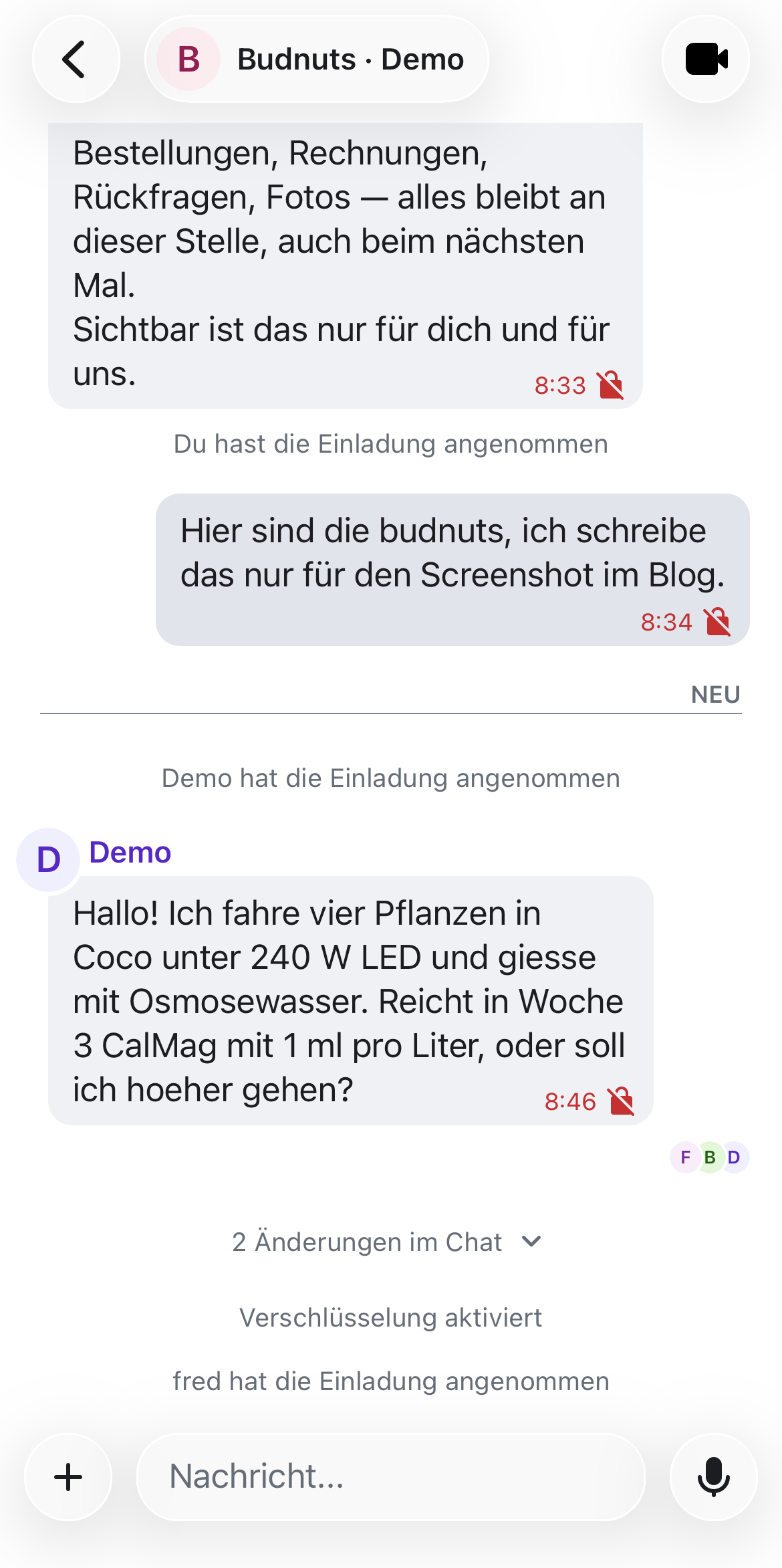
Even as a linked customer the chat window in the shop stays the most convenient entry point. It then takes you into your channel instead of starting a second, separate conversation. That way there is one history instead of two, and we do not have to check in two places what has already been discussed.
Calls, video and screen sharing
Sometimes writing is not enough. In your channel you can therefore start a call directly: voice, video and screen sharing, all in the browser, without installing anything. It helps with two kinds of question in particular. First "look at what the plant is doing here", where the camera settles in ten seconds what would be a long exchange in text. Second anything where you want to show us something on your screen.
For an arranged appointment you need no account at all. When we agree on a video appointment you get an invitation link on call.budnuts.de from us. Click it, enter a name, you are in. The same goes for partners, suppliers and anyone else who wants a one-off conversation with us.
The community chat
Alongside the private channel there is a shared room: the Budnuts community. This is where customers swap notes on setups, dosing and harvest, with our team reading along and helping when things get stuck. You reach it through the "Community" tab in the chat window and in your customer account.
Two differences from the private channel are worth knowing, and we point them out in the window as well before you post for the first time:
- ✓The channel with the team is private and end-to-end encrypted. Only the team sees what you write there.
- !The community is public. Every verified customer reads along, under your chat name.
The community chat is not an open forum. Reading and posting is for people who have ordered from us and linked their account. That is deliberate: a room anyone can walk into is an advertising channel for strangers within a short time. If you have not ordered yet, you see a note about what awaits you there instead of the messages.
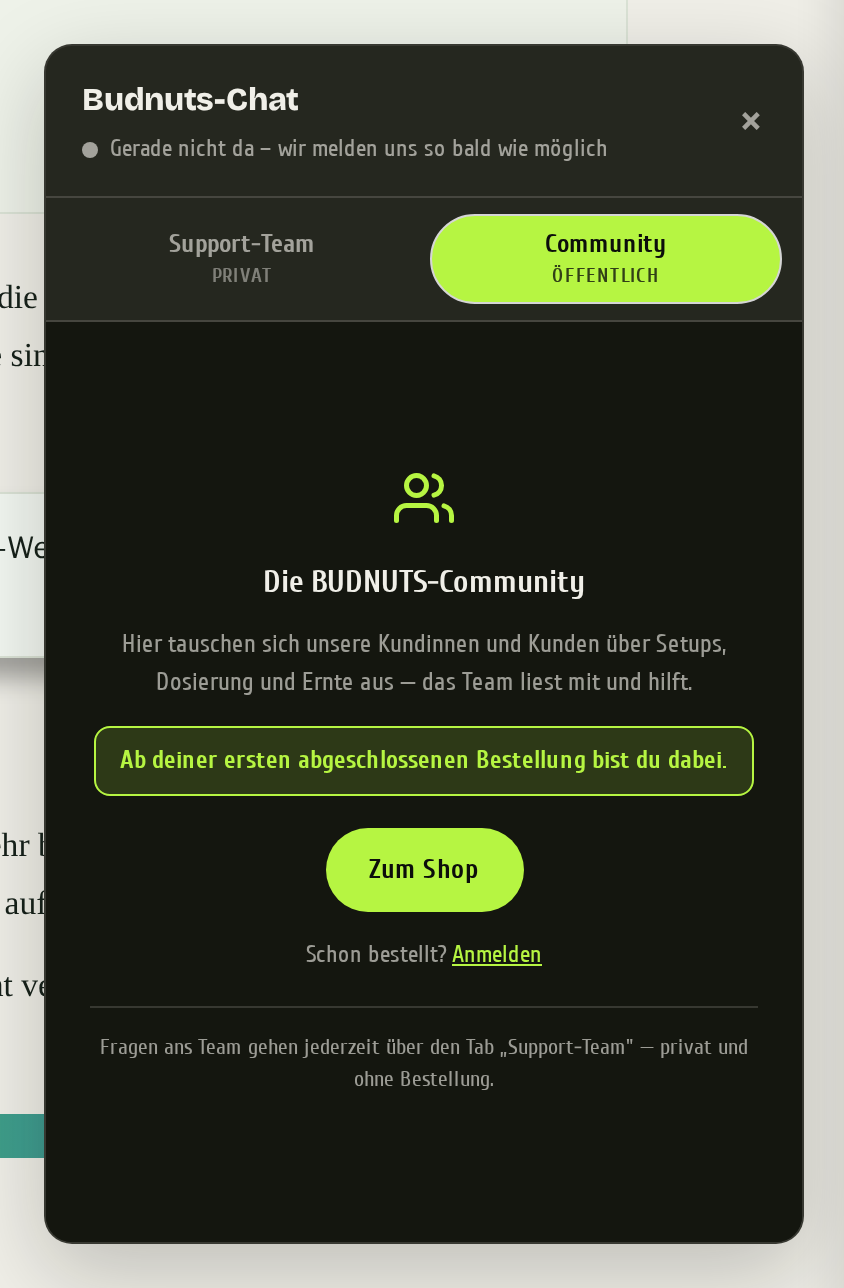
To keep the tone as it is, a simple moderation runs alongside: it slows down message floods and filters clear abuse. Everything beyond that is done by people.
If you prefer to follow along in a proper Matrix programme rather than the chat window, you will find a join link for the community in the same place.
For partners and affiliates
If you promote us, through our affiliate programme or as a creator, you have different questions from a regular customer: how is my link doing, when is the payout, may we use this particular photo. There is a separate entry point for that on budnuts.de/partner/.
It is a form in four steps: access, private details, public profiles, review and submit. You pick a name once, and it then carries everything: your shop login, your chat handle, your referral link and the discount code that goes with it.
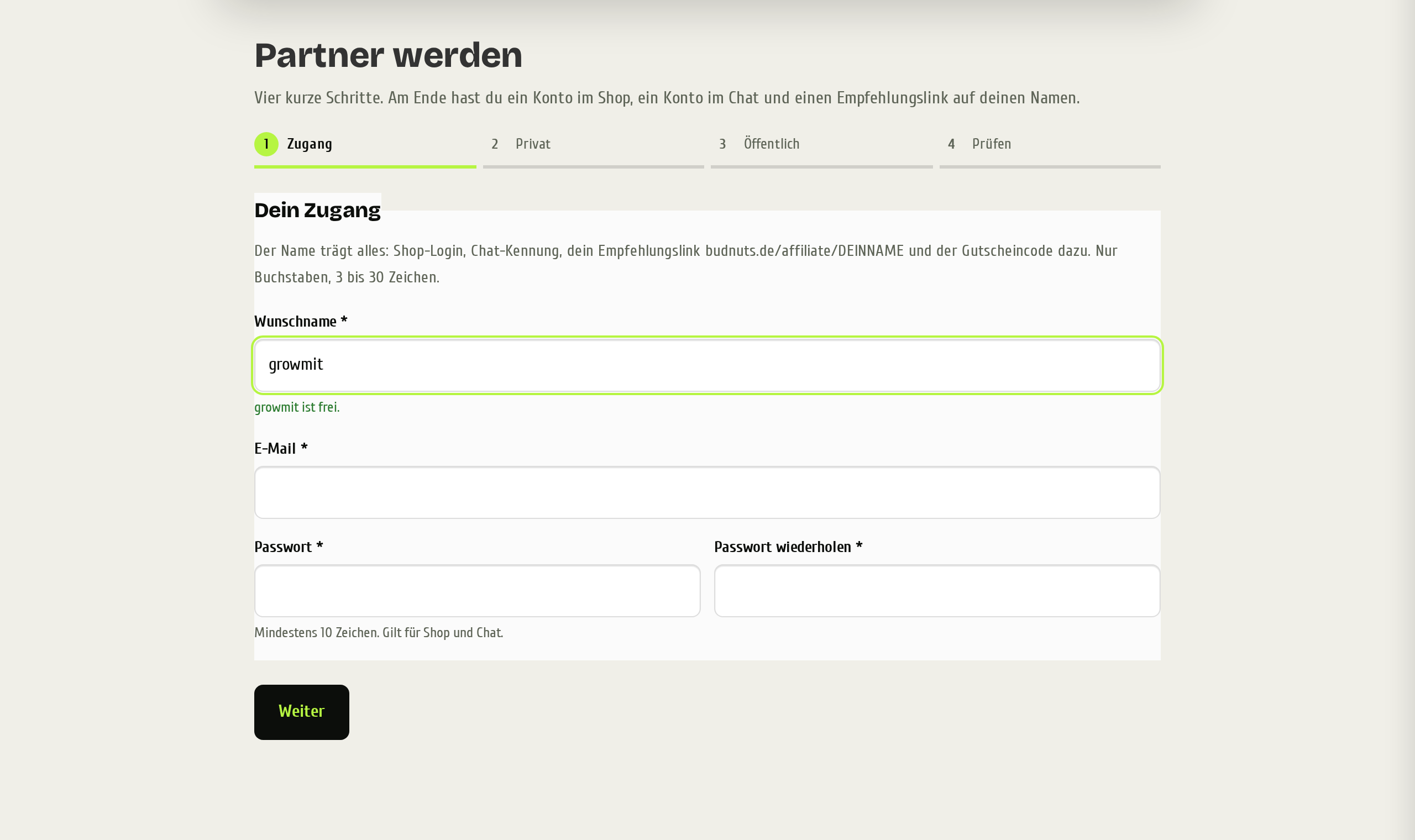
At the end of the form your shop account and your chat account are ready right away, including a private channel to us. The referral link and the welcome code follow once we have approved you, and we get in touch when we have.
For partners the chat is therefore the actual working route to us. Quick queries, approvals for image material, a fast video call instead of a chain of scheduling emails. If you work with us without being a customer, as a supplier for instance, you get a personal invitation from us instead. A chat account never comes into being on its own here.
Encryption: where end-to-end applies and where it does not
Two different things get called encrypted in chat, and they are easily confused. One is the transport: everything between your device and our server travels encrypted, as it does everywhere on the web. The other is end-to-end: there the key lives only on the devices of the people involved, and even we as the operator cannot read the content, although it passes through our server.
Our rule: end-to-end wherever only humans talk to each other. Plain text only where a programme of ours unavoidably has to read along for the thing to work at all. And we tell you which case applies where, instead of putting a tick next to everything.
- ✓Your private channel with the team is end-to-end encrypted. Only you and we talk there, so no software needs to read along.
- !The chat window without an account and the community chat are not. Both only work because a programme of ours sits in between.
Why the chat window cannot be end-to-end. It works without an account, and that is precisely the point: end-to-end encryption needs a key that belongs to an account and to your devices. Without an account there is no such key. On top of that, your enquiry lands in our order system so somebody from the team can answer it, even when you are not online. Something we cannot read, we also could not answer.
Why the community cannot either. Everyone who has bought from us may post there, including people without their own chat account. Our software places their messages into the room. That is convenient, but it has a price: what passes through a programme is readable by that programme. So treat the community chat like a forum, not like a conversation behind closed doors. The private channel is there for that.
What you have to do for it, and please actually do it. The first time you sign in, the chat asks whether it should set up recovery. Choose Continue there, not "Dismiss", and save the key somewhere, in your password manager for instance. That is the one bit of effort real encryption asks of you.
The reason: the keys live on your devices, not with us. Lose your only device or clear your browser data, and we cannot hand your history back, because we cannot read it either. With the recovery key you get it back yourself. Without it, it is gone, for us too. That is not carelessness on our part, it is exactly what "end to end" means.
Calls run on their own technology. What matters to us there above all is that they go through our server and not through some outside service where we do not know what happens to the stream.
What a customer account cannot do
We are not a chat provider, and that should be noticeable. With your chat account here you cannot create your own rooms and cannot invite strangers. The chat is the route to us and into the community, not a free replacement for a messenger.
This is not a limitation we hide. Anyone who discovers it later would take it for a bug. The reason is simple: an open chat service attracts abuse, and we would rather put our time into fertiliser than into fighting spam.
And one small thing that surprises people otherwise: you change the chat password in the shop, not in the chat. The button is blocked inside the chat so the two passwords cannot drift apart.
What happens to your messages and how long we keep them is in the privacy policy. We do not want to maintain it in two places, because sooner or later one of them would be wrong.
On your phone and in other programmes
Everything works in the browser, on a phone too. If you prefer an app, take any Matrix programme, Element for example. When signing in you have to change the server once, otherwise the app ends up at the default provider and does not know your name.
Install Element
From the app store of your choice. Any other Matrix programme works just as well.
Change the server
When signing in, tap "Edit" next to the server and enter guests.baeste.eu instead of the pre-filled one.
Sign in
With your chat name and your budnuts.de password.
After that you have your conversations on your phone, with notifications, and the channel with the team is the same one as in the browser.
Frequently asked questions
Do I have to link my account to get help?
No. The support chat in the shop works without an account and without an order, and it stays that way.
Does the community see my real name?
No, your chat name is shown there. Real name, address and orders are not visible to others.
Is the chat encrypted?
Your private channel with the team is, end to end. The chat window without an account and the community chat are not, because a programme of ours sits in between so both work at all. The encryption section covers it in detail.
I have lost my recovery key.
As long as you are still signed in on one device, everything keeps working and you can set up recovery again from there. Do it right away. Once the last session is gone, the old history can no longer be decrypted, by us just as little.
I cannot get into the chat after changing devices.
That happens when no session is left and no recovery key was saved. The way out runs through your customer account: under "Chat", undo the link and link again. You then get fresh access. It costs two things: you need a new chat name, because the old one stays taken, and the old history is no longer readable. Write to us through the chat window in the shop first, and we will check whether there is a more convenient route in your case.
What happens when I change my shop password?
The chat follows automatically. If the two ever drift apart, after a reset for instance, you see a note in the "Chat" tab and can straighten it out there in one step.
Can I change my chat name later?
No. The name is permanently tied to your chat account. Only the display name in your chat programme can be changed.
I already had a chat account with you before the change.
Enter the existing chat name in the "Chat" tab under "I already have a chat account". We check the assignment by hand and approve it, and your existing chat password stays as it is.
What happens when I undo the link?
The chat account is deleted, along with your messages in the rooms. Customer account, orders and invoices are untouched.
Can I use the chat for private conversations?
Not with us. Your own rooms and invitations to strangers are blocked with a customer account. For private use there are many other Matrix servers, the protocol is the same everywhere.
More from the help section
- Orders & order status (what else your account can do)
- Affiliate programme (referral link, tiers and payout)
- Discounts and benefits at a glance (all programmes on one page)